Every committee meeting has a version of the same moment. The Treasurer presents the month’s numbers, someone asks why expenses are up, and the honest answer is that nobody can say for certain without going back and comparing months by hand.
ADDA’s Monthly Income & Expenditure Report puts twelve months of income, expenses and the surplus or deficit between them into a single view. This article covers what the report shows, who it helps and how to read it.
Table of Contents
What is a Monthly Income & Expenditure Report for a housing society?
It is a statement showing the society’s income and expenses for each month over a twelve-month period, broken down by account head, with the resulting surplus or deficit for every month.
Instead of looking at one month at a time, the committee sees the full year side by side. Maintenance charges, water charges, facility bookings, fund contributions and every expense head appear as a row, with a column for each month and a grand total for the period.
In ADDA it sits under Admin Reports, in the General Ledger section (Admin Reports > General Ledger > Monthly Income and Expenditure Report)
What Benefits does the Monthly Income & Expenditure Report bring to your Society and your Treasurer?
Mostly, it gives you better meetings.
- Ravi can see how each account head has behaved across the year, not just how it looked last month.
- A cost that has climbed steadily and a cost that spiked once stop looking alike, and they call for completely different responses.
- Questions get answered while everyone is still in the room. When somebody asks why expenses are up, Ravi points at the row instead of noting an action item for next time.
- Monthly surplus and deficit figures show which way the community’s finances are heading. An annual figure can hide four uncomfortable months quite easily.
- The report exports to PDF or Excel, so it can go out with the agenda. When everyone has seen the numbers beforehand, the meeting starts somewhere more useful.
Why is it hard to spot financial trends in a housing society?
Because a single month of figures cannot tell you whether something is a one-off or the start of a pattern.
A ₹60,000 electricity bill means nothing on its own. It means something entirely different if the three months before it were ₹28,000, ₹32,000 and ₹36,000.
To see that, the Treasurer has to pull each month separately and line the figures up manually, head by head. Most do it for one or two categories they already suspect, which means the increases nobody suspected go unnoticed until they are large.
What goes wrong when committees review one month at a time?
Discussions run on interpretation rather than evidence, and decisions get postponed.
Spikes and trends cannot be spotted. A one-time repair and a steadily rising utility cost both show up as “expenses are higher this month.” They call for completely different responses, and without the surrounding months there is no way to tell them apart.
Deviations cannot be explained. When a committee member asks why costs rose, the Treasurer either has an answer prepared for that specific question or does not. Anything unanticipated turns into “I will check and revert.”
Gaps between income and expenses build quietly. A society running a small monthly deficit is in a different position after eight months than after one. If nobody is looking at the run of months together, the trajectory is invisible until it is a problem.
Decisions get deferred. A committee that is not confident in what the numbers are showing tends to postpone the decision, which means the next meeting starts with the same conversation.
Who benefits most from this report?
The Treasurer, who prepares the financial review and answers the questions that follow it.
Take Ravi, Treasurer of a residential association. Ahead of a committee meeting he reviews the month’s expenses and sees that costs look higher than usual, but cannot say where the increase is coming from without pulling electricity, maintenance and security figures across several months and comparing them himself.
In the meeting, somebody asks why expenses have gone up. He cannot say with confidence whether it is a one-off or something that has been building. The discussion moves on to assumptions and the decision waits for the next meeting.
The Management Committee benefits alongside him. Every member is reviewing the same view, so the discussion is about what to do rather than about what the numbers mean.
What does the Monthly Income & Expenditure Report show?
A twelve-month view of income, expenses and the surplus or deficit for each month, ending at the month you select.
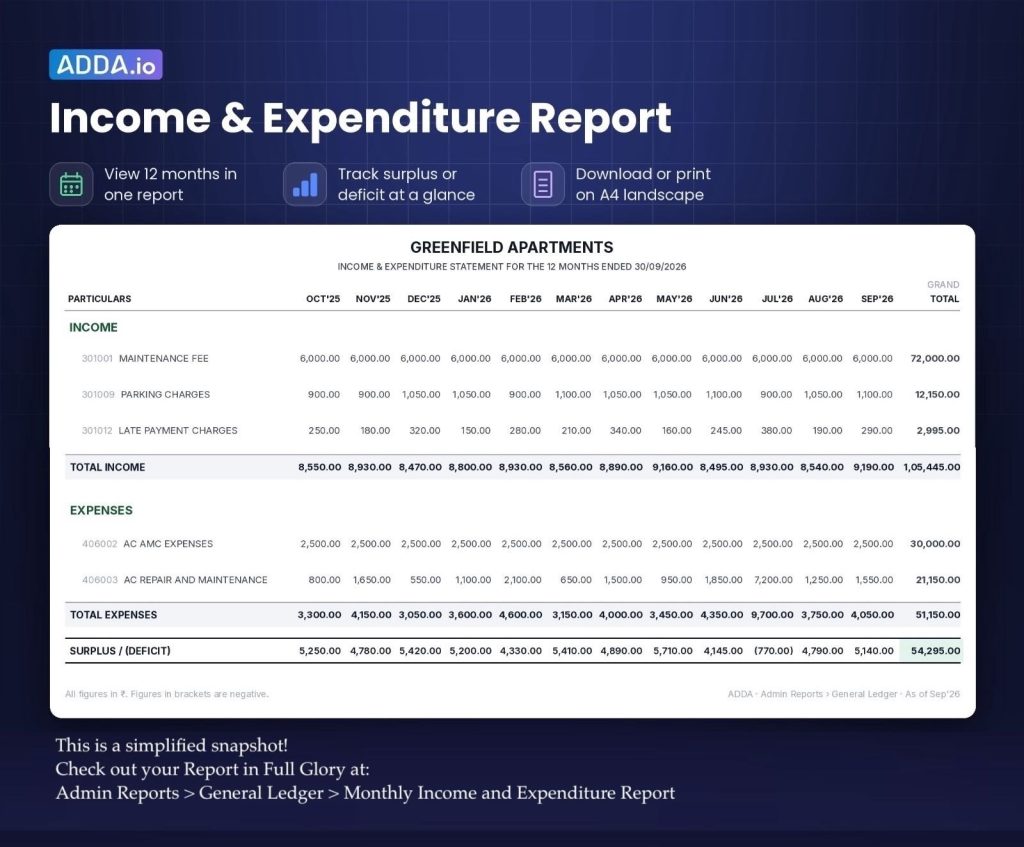
Income, grouped by category and account head. Maintenance income covering maintenance charges, water charges, interest on dues, non-occupancy charges and penalties. Facility income covering facility bookings, function room, guest room, parking and access cards. Fund contributions covering sinking fund and corpus fund. Each group carries a subtotal.
Expenses, presented the same way below the income section.
Surplus or deficit, calculated for each month at the foot of the statement.
Every account head is a row and every month is a column, with a grand total column for the full period. Account codes appear alongside the names, so the report ties directly to the general ledger.
Can the report be exported and shared with the committee?
Yes. The report can be exported as PDF, CSV or Excel, or copied directly.
This matters more than it sounds for meeting preparation. A Treasurer who circulates the statement with the agenda gives the committee time to look at it before the meeting starts, which changes the quality of the discussion. Excel and CSV exports also let anyone who wants to work on the figures do so without asking for a separate extract.
The report also includes a search by account or code, which is useful when the statement runs to many heads and you are looking for one in particular.
Frequently asked questions
What period does the ADDA Monthly Income & Expenditure Report cover?
Twelve months, ending with the month you select in the “As of month” filter.
Where do I find this report in ADDA?
Under Admin Reports, in the General Ledger section.
Can I export the income and expenditure statement?
Yes. It can be exported as PDF, CSV or Excel, or copied directly from the screen
Does the report show surplus or deficit for each month?
Yes, calculated month by month at the foot of the statement, with an option to show or hide it.
Is income broken down by category?
Yes. Income appears grouped by category with account heads and account codes under each, with subtotals per group and a grand total for the period. Expenses follow the same structure.
Can I search for a specific account in the report?
Yes. The report includes a search by account name or account code.