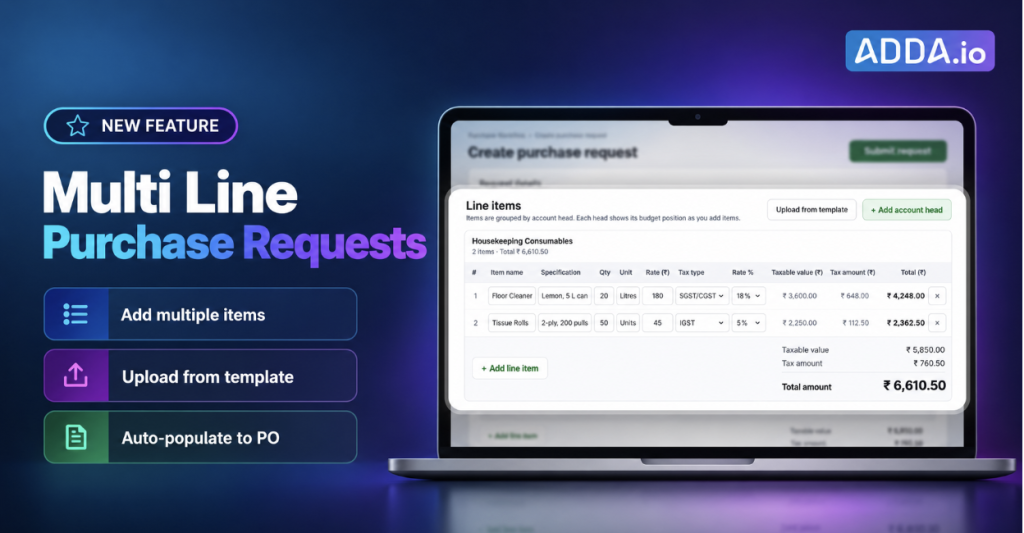
- ADDA’s multi-line Purchase Requests capture every item, quantity, unit, cost and tax inside the PR, and carry them straight into the Purchase Order once approved.
- Purchases get approved faster, POs are created in a few clicks, and what gets ordered matches exactly what was approved.
Table of Contents
What are multi-line Purchase Requests in ADDA and how do they work?
Multi-line Purchase Requests let society staff list every item inside the PR itself, so approvers see the full requirement on screen and the approved items flow automatically into the Purchase Order
Step 1: Add line items while creating the PR
In the Purchase Request form, add the following details:
- Description
- Expense account
- Quantity and unit
- Cost
- Taxes (GST ot VAT)
ADDA calculates the tax, line total and grand total as you go. Use Add More for the next item.
Step 3: Review and approve with full visibility
Once the PR is saved, every line item is visible within the request. Approvers review items, quantities and costs right there, across each approval level, without opening a single attachment.
Step 4: Create the PO with items already filled in
When the approved PR is converted into a Purchase Order, ADDA fetches every line item with its specifications into the PO automatically. Review it, confirm, and the PO is ready.
What are the benefits of multi-line Purchase Requests for societies?
The society enters each item once and uses it all the way from request to order, so purchasing gets faster, cleaner and easier to audit.
For the management committee and admin team
- Faster approvals: approvers decide from what is on screen, with nothing to download.
- POs in minutes, not hours: approved items carry straight into the Purchase Order, with no retyping.
- What’s approved is what’s ordered: quantities, prices and taxes stay consistent from PR to PO.
- Cleaner audit trail: every purchase is itemised and searchable inside ADDA, ready for auditors and AGM questions.
- Tighter budget control: each line maps to an expense account, so spend is tracked precisely.
For residents
- Transparent use of maintenance funds: society spending is recorded item by item, not as one lump sum.
- Fewer supply gaps: housekeeping and maintenance supplies are ordered on time and in the right quantities, so common areas stay clean and well-kept.
How does a society office raise and approve a multi-item purchase in ADDA?
Ashok works in the society office at Sharlow Apartments, a gated community with several towers. Every month he raises a Purchase Request for housekeeping consumables:
- Floor Cleaner: 20 litres
- Garbage Bags: 10 packs
- Glass Cleaner: 5 litres
- Tissue Rolls: 50 units
Ravi, the society’s treasurer, approves these requests.
With multi-line PRs, Ashok’s monthly housekeeping order goes from request to purchase order in one smooth flow.
Ashok opens Create Purchase Request, selects the vendor and adds four line items: floor cleaner, garbage bags, glass cleaner and tissue rolls, each with its quantity, unit, cost and GST. ADDA totals it up, and he submits.
Ravi gets the approval request on his way back from work. He opens it, sees all four items and their costs right there, and approves in under a minute.
Ashok then creates the Purchase Order from the approved PR. All four items are already in it, exactly as approved. He checks it once and sends it to the vendor.
Frequently asked questions about multi-line Purchase Requests
Can I add multiple items to a single Purchase Request in ADDA?
Yes. ADDA lets you add as many line items as you need to one Purchase Request, each with its own description, account, quantity, unit, cost and taxes.
How do line items get into the Purchase Order?
When you create a Purchase Order from an approved PR, ADDA automatically fetches all its line items and their specifications into the PO. There is no need to re-enter them.
Can I upload a long list of items instead of typing them?
Yes. Fill in ADDA’s batch upload template and upload it; each row becomes a line item in the PR.
Does ADDA calculate taxes on each line item?
Yes. You choose the applicable tax for each item, GST/VAT, and ADDA calculates the tax, line total and grand total.
Which countries is this feature available in?
Multi-line Purchase Requests are available for ADDA communities in India, the USA, the UAE and Mauritius.
Make every society purchase itemised, approved and ordered in one flow
Enter each item once, and ADDA carries it from request to approval to Purchase Order, accurately.
Log into your ADDA Admin Portal and raise your next Purchase Request with line items today.