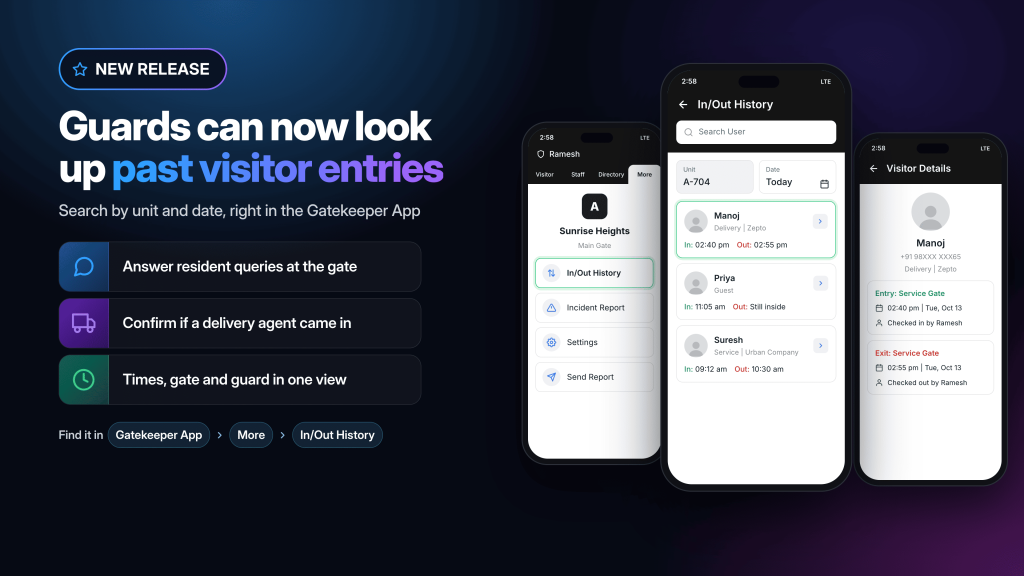
Security guards can now look up past visitor entries directly in the ADDA Gatekeeper App. Filter by unit and date, open any entry, and see exactly when a visitor arrived, when they left, which gate they used and who approved them in.
It means the guard at the gate can answer a resident’s question about yesterday’s visitor as easily as one about the person standing in front of him.
Table of Contents
What is In/Out History in the ADDA Gatekeeper App?
It is a record of past visitor check-ins and check-outs, available to guards inside the Gatekeeper App and searchable by unit and date.
Guards find it under the More tab, alongside Incident Report, Settings and Send Report. Entries stay available after a visitor has checked out, so a completed visit can be looked up whenever a question comes up about it.
What Benefits does Visitor In/Out History bring to your Society and your Security Guards?
Residents get an answer at the place they went looking for one.
- When Anita calls the gate about a delivery she cannot account for, the Security Guard Ramesh looks it up and tells her while she is still on the phone.
- He can see when the agent came in, when they left, which gate they used and who cleared them, which is usually enough to settle the question outright.
- Completed visits stay available, which is what makes it useful. These questions almost never come up while the visitor is still at the gate — they come up an hour later, or the next morning.
- Community managers get fewer interruptions, because routine lookups no longer travel up to somebody with ERP access and back down again.
The ERP is still where reporting and detailed review belong. This is about the question in front of the guard, right now.
What details does a visitor entry show?
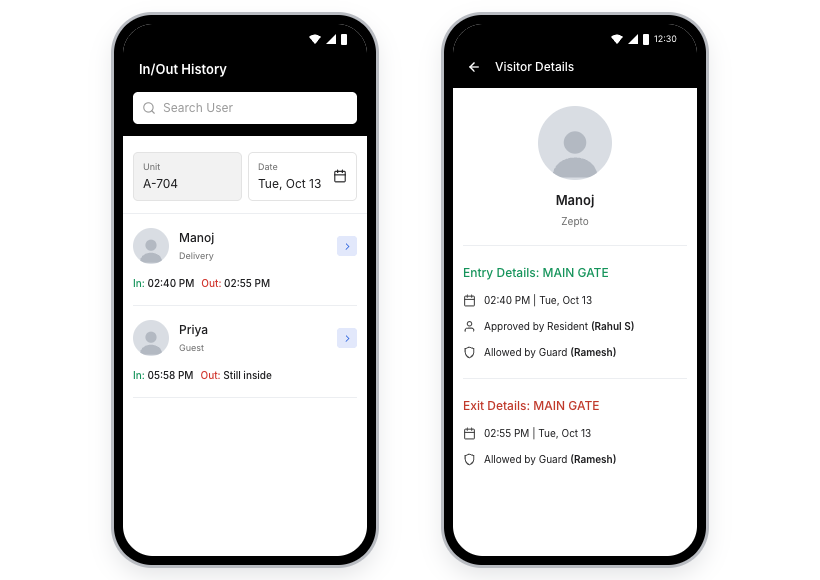
Entry and exit times, the gate used, which guard checked the visitor in, and who approved the entry where applicable.
That level of detail is what turns a lookup into an answer. A resident asking when their guest left gets the time. A resident asking whether a service technician came through the main gate or the service gate gets that too, along with who cleared the entry.
How does a guard confirm whether a delivery agent actually entered?
Anita, a resident in A-704, gets a “Delivered” notification for a parcel that has not reached her. She isn’t sure whether the agent ever came in, so she calls the gate.
Ramesh, on duty, opens In/Out History and finds the entry. In through the service gate at 2:40 PM, checked out at 2:55, cleared by the guard on shift.
So the agent did come in and leave, and Anita can take it up with the courier with the exact entry and exit times in hand.
This is the most common question a gate receives, and it now has a definitive answer that does not depend on the visitor’s phone number or on anyone else’s availability.
Can guards see both check-in and check-out in one place?
Yes, in a single list rather than two separate views.
Most resident questions are about timing. What time did my guest leave? How long was the technician on the premises? Both halves of the record are needed, and seeing them together means one lookup and one answer.
Who can view visitor history in ADDA?
Guards, inside the Gatekeeper App, and community managers and security supervisors through the ERP.
The ERP remains the place for reporting, audits and detailed review across the whole community. The Gatekeeper App gives the person at the gate what they need for the question in front of them, without needing admin access or a computer.
Why does answering at the gate matter?
Because the gate is where residents go with visitor questions, and an answer there is worth more than the same answer an hour later.
A resident with a query about a visitor walks to the gate or calls it. Getting an immediate answer is the difference between a closed question and a question that stays open in someone’s mind for the rest of the day.
It also keeps community managers free. Routine lookups no longer need to travel up to somebody with ERP access and back down again, which is time returned to people who have very little of it.
Frequently asked questions
What is In/Out History in the ADDA Gatekeeper App?
It is a record of past visitor check-ins and check-outs that guards can view directly in the Gatekeeper App, filtered by unit and date.
Where do I find In/Out History?
Under the More tab, alongside Incident Report, Settings and Send Report.
Can I search visitor history by flat and date?
Yes. History can be filtered by unit and by date.
What details does a visitor entry show?
Entry and exit times, the gate used, which guard checked the visitor in, and who approved the entry where applicable.
Can a guard check whether a delivery agent actually entered?
Yes. The guard looks up the unit and date, finds the delivery entry and opens it to confirm the gate, time and approvals.
Can visits that have already been checked out be looked up?
Yes. Completed visits remain available in In/Out History.
Can community managers still use the ERP visitor log?
Yes. The ERP remains available for reporting and detailed review across the community.