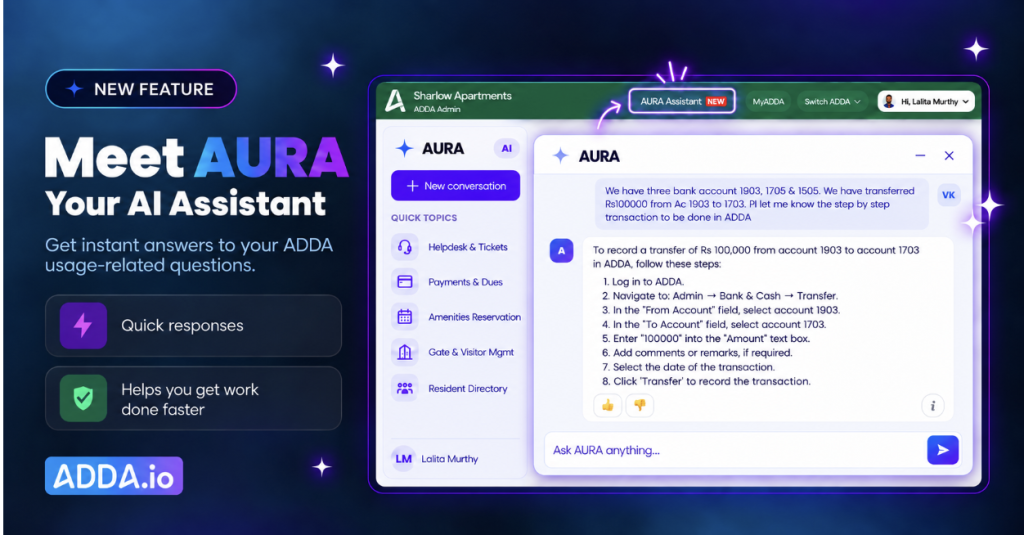
- Running a society brings a steady stream of how-to questions, from billing setups to AGM polls, and each one is best answered on the spot.
- AURA is ADDA’s AI-powered help assistant inside the Admin Portal: ask a question in plain language, get click-by-click instructions instantly.
- Estate managers, accountants and committee members get more out of ADDA from day one, without manuals, waiting or guesswork.
Table of Contents
What is AURA and how does it work in ADDA?
AURA is an AI-powered help assistant built into the ADDA Admin Portal that answers any question about how ADDA’s features and settings work, with click-by-click instructions, the moment you ask.
It is built for the people who run the society day to day: estate managers, accountants, treasurers and management committee members.
Ask in your own words
Type a question the way you would ask a colleague:
- “How do I automate late fees?”
- “How do I pass journal entries?”
- “How do I set up an AGM poll?”
- “Where do I find the report for unpaid maintenance dues?”
Get click-by-click instructions
AURA replies with the exact steps to follow inside ADDA: which module to open, what to click, which setting to change. You follow along and finish the task while the answer is still on screen.
Understand why a feature matters
AURA does more than point to buttons. Ask what a feature is for, and it explains how it helps your society, so committees discover capabilities they are already paying for and put them to work.
What are the benefits of AURA for society admins and committees?
AURA turns ADDA’s full depth into something every admin can use confidently from their first day in the role.
For management committees
- Smooth handovers: a new treasurer or secretary is productive in days, not months, because the know-how no longer depends on one person.
- Confident decisions: committee members understand what each feature does before they switch it on.
- More value from the platform: committees discover and use more of ADDA’s 1,250+ features.
For estate managers and accountants
- Hours saved every week: answers arrive in seconds, so tasks get finished in one sitting.
- Fewer setup errors: step-by-step guidance on billing, penalties and accounting entries means things are configured right the first time.
- Less firefighting: routine how-to questions from the committee get answered without pulling the manager off the floor.
For residents
- Accurate, on-time bills: a well-configured billing setup means fewer disputes over dues and penalties.
- Better-run AGMs: polls and notices go out properly, on schedule.
- Faster responses: a manager who spends less time looking things up has more time for residents.
Why do society admins need instant answers while managing their community?
Because estate managers and accountants handle billing, accounts and polls all day, and committee members step in around their own jobs, how-to questions come up constantly, and each one is best answered on the spot.
Ravi was elected treasurer of a 600-flat gated community on Sarjapur Road at the April AGM. He inherited a ledger, a late-fee policy and a WhatsApp voice note from the outgoing treasurer, who has since moved to Pune. The next billing cycle is two weeks away, and Ravi works a full-time job.
Priya, the community manager, is the one everyone turns to. Between a lift breakdown in Tower C and 40 open helpdesk tickets, she also fields Ravi’s questions: where is the collections report, how do penalties get applied, how was last year’s AGM vote run?
ADDA’s support team is always within reach: by phone, through tickets, and on WhatsApp during deployment. But every channel involves some wait, however short, and questions like Ravi’s tend to come up at 11 pm, the night before bills go out. AURA skips the wait: instant answers, right on screen, the moment you ask. It solves:
- Finishing a task in one sitting, without pausing to look up the next step
- Getting answers the moment a question comes up, mid-shift or after hours
- Bringing a newly elected committee up to speed quickly
- Discovering which feature or report fits the task in front of you
How does a new treasurer get up to speed with AURA?
With AURA, Ravi sets up his first billing cycle himself, in one evening, without waiting on anyone.
After dinner, he logs into the ADDA Admin Portal and asks AURA, “How do I automate late fees?” The steps appear on screen. He follows them, sets the penalty rule the committee agreed on, and it applies automatically to every overdue bill from this cycle on.
Next he asks how to pass the journal entry for the lift AMC adjustment the auditor flagged. Ten minutes later, the books are in order.
The next morning, Priya asks AURA how to set up the AGM poll for next month. While she is at it, she asks which report shows unpaid maintenance dues, and shares it with Ravi before the committee meeting.
Every answer arrives in seconds, right on screen. Priya gets her morning back for Tower C.
Where do you find AURA in ADDA?
AURA lives inside the ADDA Admin Portal (the ERP side) and is available to admins as soon as they log in.
- Log into the ADDA Admin Portal.
- Open AURA from [confirm entry point: icon / menu path].
- Type your question and follow the steps AURA gives you.
Frequently asked questions about AURA
What is AURA in ADDA?
AURA is ADDA’s AI-powered help assistant for society admins. It answers questions about how any ADDA feature or setting works and gives click-by-click instructions inside the Admin Portal.
Who can use the AURA assistant?
AURA is built for anyone who manages a community on ADDA’s Admin Portal, including estate managers, facility managers, accountants, treasurers and management committee members.
What kind of questions can I ask AURA?
You can ask how to set up a feature, what a feature is useful for, or where to find a specific report. Examples: “How do I automate late fees?”, “How do I pass journal entries?” and “How do I set up an AGM poll?”
Do I need training to use AURA?
No. You type a question in plain language, the way you would ask a colleague, and AURA replies with the steps to follow.
Does AURA make changes to my society’s settings?
AURA guides you through each step; you make the change yourself, so you stay in full control of your society’s configuration.
Does AURA replace ADDA’s support team?
No. ADDA’s support team is still there by phone, tickets, and WhatsApp during deployment. AURA adds instant, on-screen answers for how-to questions, so routine help never involves a wait.
Start running your society with AURA today
ADDA has spent 17+ years building 1,250+ features for residential communities. AURA puts every one of them a single question away.
Log into your ADDA Admin Portal and ask AURA your first question today.